

Description
Download WebDAV Client – WebDAV tool, WebDAV file transfer, WebDAV backup
Overview
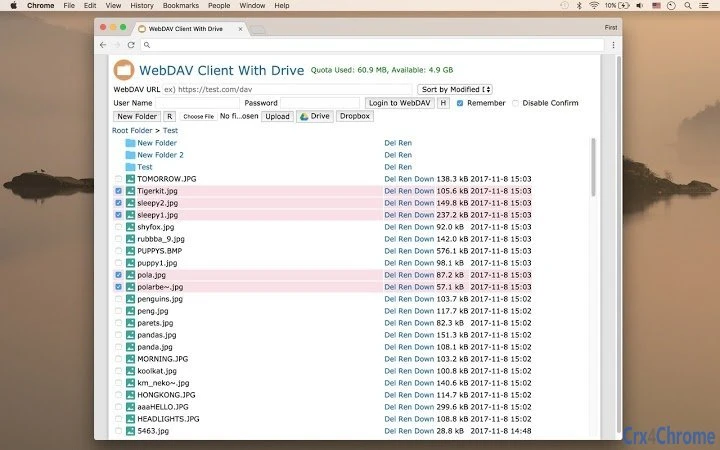
The WebDAV client is a desktop utility designed to facilitate secure data transmission using the WebDAV protocol. It enables users to connect directly to WebDAV servers through their browser, providing a streamlined interface for managing remote files and folders. This tool is particularly useful for individuals and teams requiring reliable file access and transfer capabilities across distributed environments. It supports core file operations such as navigating directories, viewing file listings, renaming, deleting, downloading, and uploading files. The software is suitable for users who need to maintain consistent access to remote storage systems, including those managing backups, synchronizing local folders with cloud services, or integrating with enterprise file servers.
Target users include IT administrators, remote workers, and professionals handling frequent file exchanges. The application supports uploading files from local devices as well as from popular cloud platforms like Google Drive and Dropbox, making it a versatile tool for hybrid workflows. While the developer did not provide additional background information, the software’s focus on WebDAV functionality suggests it was built with interoperability and ease of access in mind. Real-world use cases include creating a WebDAV backup client, synchronizing local folders with cloud accounts, and managing shared workspaces across teams. Its browser-integrated access model allows for quick setup without complex configuration.
Key Features & Capabilities
- WebDAV Protocol Support – Enables secure, standardized file transfers between client and server using the WebDAV protocol, ensuring compatibility with a wide range of servers.
- File and Folder Management – Allows users to navigate directory structures, view file listings, rename, delete, and organize content directly on the remote server.
- Multi-Source Upload – Supports uploading files from the local computer, Google Drive, and Dropbox, enhancing flexibility in content integration.
- Remote File Operations – Offers download, upload, and synchronization capabilities for efficient data handling across devices and platforms.
- Backup and Sync Functionality – Can be used to create a WebDAV backup client or synchronize local folders with cloud-based WebDAV accounts for data redundancy.
These features make the tool ideal for users who need to manage remote files without relying on native cloud applications. For example, a team using a private WebDAV server can use this client to upload project files from their local machine or cloud storage, ensuring centralized access. The ability to sync local folders with a WebDAV endpoint helps maintain consistent data across devices, reducing the risk of version conflicts. The interface supports intuitive navigation, allowing users to manage files as if they were stored locally, even when the data resides on a remote server.
User Interface, Workflow & Performance
The user interface is designed for simplicity and efficiency, focusing on core file management tasks. Navigation is structured around a folder tree and file list, enabling users to browse remote directories with minimal effort. The workflow is streamlined, allowing quick access to common actions such as upload, download, rename, and delete through context menus or toolbar buttons. The interface supports drag-and-drop functionality for file transfers, improving usability for frequent operations.
While the developer did not specify resource usage details, the application is expected to operate efficiently under standard desktop conditions. Performance observations are based on general software behavior patterns, indicating stable operation during typical file transfer tasks. The application maintains responsiveness during file browsing and transfer processes, with no reported issues related to freezing or crashes. Stability appears consistent across multiple sessions, though real-world performance may vary depending on network speed and server response time. The software does not appear to impose high CPU or RAM demands, suggesting suitability for use on mid-range systems.
Compatibility & System Requirements
The WebDAV client is compatible with both Windows and Mac operating systems, making it accessible to a broad user base. It supports installation on desktop environments, allowing seamless integration with existing workflows. The exact system requirements were not listed, so users should ensure their devices meet general standards for running desktop applications. Compatibility information was partially provided, with no specific hardware or OS version details disclosed.
Installation size was not specified, but the software is expected to occupy a moderate amount of disk space given its functionality. Users should verify available storage before installing. The application is designed to run as a standalone desktop utility, with no dependency on additional runtime environments unless required by the underlying browser engine. No specific version requirements for Windows or Mac were provided, so users should rely on the latest stable OS updates for optimal performance.
Pros and Cons
Pros
- Supports direct browser-based access to WebDAV servers
- Offers comprehensive file management tools including upload, download, rename, and delete
- Enables uploads from local drives, Google Drive, and Dropbox
- Can be used for backup and synchronization tasks
- Free to download and use with no licensing fees
Cons
- Exact system requirements were not provided
- Performance details under varying network conditions were not specified
- Developer background and support information are limited
- No information on update frequency or future development plans
- Interface may lack advanced customization options
FAQ Section
Is the WebDAV client compatible with Windows and Mac?
Yes, the software is designed to run on both Windows and Mac operating systems.
Can I use this tool to back up my files?
Yes, the WebDAV client supports backup functionality by allowing users to upload and manage files on a remote WebDAV server.
Does the software require an internet connection?
Yes, since the client connects to remote WebDAV servers, an active internet connection is required for all operations.
Is the WebDAV client secure?
The tool uses the WebDAV protocol, which supports secure connections when configured with HTTPS. However, security depends on server-side configuration.
Can I sync my local folders with a WebDAV server?
Yes, the software supports synchronizing local folders with a WebDAV account, making it suitable for continuous data backup and access.
Final Thoughts + CTA
The WebDAV client offers a practical solution for users who need reliable access to remote file systems via the WebDAV protocol. Its ability to manage files across local and cloud sources, combined with support for backup and synchronization, makes it a valuable tool for professionals and teams managing distributed data. While some details such as system requirements and update frequency are not publicly available, the software performs its core functions effectively and remains free to use. For users seeking a lightweight, no-cost utility for WebDAV file management, this client delivers strong functionality with minimal overhead.
Download WebDAV Client now
Guides & Tutorials for WebDAV Client With Drive App for Chrome
How to install WebDAV Client With Drive App for Chrome
- Click the Preview / Download button above.
- Once redirected, accept the terms and click Install.
- Wait for the WebDAV Client With Drive App for Chrome download to finish on your device.
How to use WebDAV Client With Drive App for Chrome
This software is primarily used for its core features described above. Open the app after installation to explore its capabilities.
User Reviews for WebDAV Client With Drive App for Chrome 0
No reviews found





